 Immigration Photo
OCI card · Government of India · checked September 2026
OCI photo requirements
The OCI card photo is 2 x 2 inches (51 x 51 mm), in color, full face and front view, on a plain light-colored background that the OCI portal's FAQ says is not white. The online application uploads it as a square JPEG. That background rule is the trap for applicants in the US: it is the opposite of the US passport photo rule, so the photo that just worked for your passport is the photo the OCI FAQ describes rejecting. Every figure here is quoted from the OCI portal (ociservices.gov.in), its Photo-Spec document, and VFS Global's US instructions.
The OCI photo specification
| Rule | Requirement |
|---|---|
| Print size | 2 x 2 inches (51 x 51 mm), in color |
| Background | Plain light-colored; the OCI portal FAQ adds "not white", with no border on the photo |
| Head height | 1 to 1 3/8 inches (25 to 35 mm), full head from top of hair to bottom of chin |
| Framing | Full face, front view, eyes open, head centered and not tilted or turned, both edges of the face clearly shown, face filling about 80% of the frame |
| Upload shape | Square: height and width must be equal |
| Upload pixels | Portal FAQ: 200 x 200 to 900 x 900. VFS Global USA: up to 1500 x 1500. The FAQ figures satisfy both |
| File | JPEG/JPG. Portal FAQ: max 200 KB. VFS USA: max 500 KB |
| Glasses | No tinted or dark glasses; frames must not cover the eyes; avoid glare |
| Head coverings | Religious reasons only, with chin-to-forehead and both face edges clearly shown |
| Editing | "Do not retouch or otherwise enhance or soften the photo" |
| Handling | Not stapled, no signatures on the photo, and the print must be the same photo uploaded online |
Where two official sources disagree (pixels, file size, the not-white qualifier), the table names both. The portal's warning is blunt: photographs that do not conform will be rejected and may delay processing.
Why your US passport photo probably fails OCI
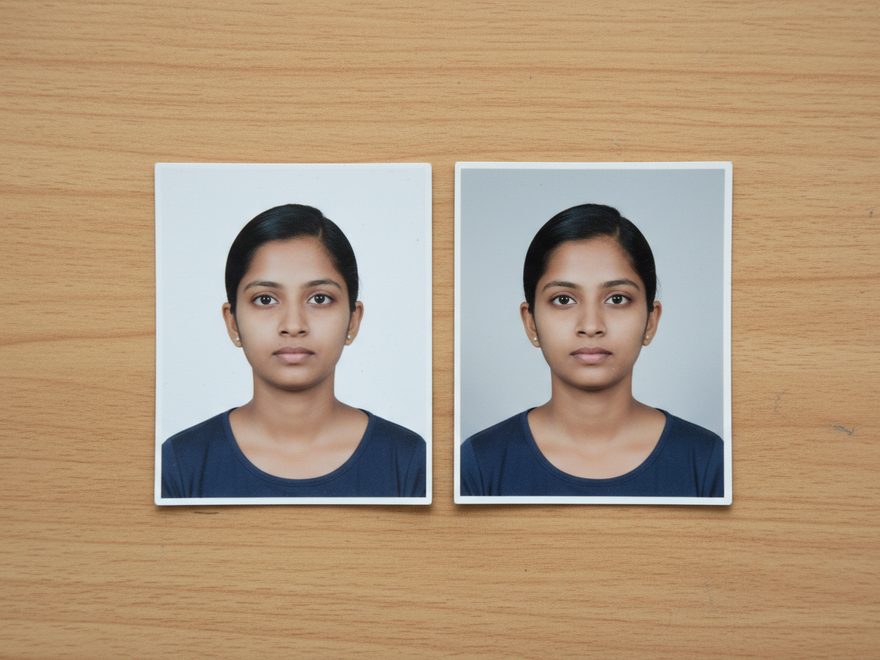
The frames are the same 2 x 2 inches and the head height bands are nearly identical (1 to 1 3/8 inches on both), which tempts people to reuse the photo. The background rules point in opposite directions: the State Department requires plain white or off-white, while the OCI portal FAQ requires plain light color, not white, without a border. A light gray or pale blue backdrop satisfies the OCI wording in both of its official variants. Shoot the OCI photo separately rather than betting a government application on the looser Photo-Spec wording.
Honesty about our own tool: the photo maker here produces US government photos on compliant white backgrounds, which is exactly what the OCI FAQ bars, so it is not the right tool for an OCI photo and this page will not pretend otherwise. What transfers from the 2x2 photo method is everything except the backdrop: even light, no shadows, camera at eye level, head centered and straight, original unedited file.
The second upload people forget: the signature
The OCI application uploads two images. Alongside the photo goes a signature image with a 1:3 aspect ratio (VFS USA figures: 200 x 67 to 1500 x 500 pixels, up to 500 KB). Children under 5 who cannot sign upload a left-hand thumb impression in blue or black ink only; minors who can write their names should sign themselves, and parents sign the designated space on the form. The printed photo you submit must be the same photo you uploaded online.
OCI photo questions
What are the OCI photo requirements?
- A color photo, 2 x 2 inches (51 x 51 mm), full face, front view, eyes open, on a plain light-colored background, with the head centered, not tilted, and measuring 1 to 1 3/8 inches. The uploaded version must be square, JPEG or JPG, between 200 x 200 and 900 x 900 pixels at up to 200 KB per the OCI portal FAQ (the VFS Global USA instructions permit up to 1500 x 1500 and 500 KB). The photo must not be stapled, must not have any signatures on it, and must not be retouched.
Can the OCI photo background be white?
- The OCI portal FAQ says no, verbatim: a plain light color background, not white, without a border. The portal's own Photo-Spec PDF says only "plain light colored background" without the not-white qualifier, so official wording varies, but the FAQ is the stricter, safer read. A light gray or light blue background satisfies both.
Can I use my US passport photo for the OCI application?
- It is risky. The sizes match (both are 2 x 2 inches), but a US passport photo must have a white or off-white background while the OCI portal FAQ requires a light-colored background that is not white. A photo that is correct for a US passport is exactly what the OCI FAQ describes rejecting.
What pixel size does the OCI photo upload need?
- Two official figures exist. The OCI portal FAQ says minimum 200 x 200 and maximum 900 x 900 pixels, JPEG/JPG, up to 200 KB. VFS Global's US instructions say up to 1500 x 1500 pixels and 500 KB. A square JPEG within the portal FAQ's figures satisfies both, so aim for those.
What are the OCI signature upload rules?
- The signature image must have a 1:3 aspect ratio (VFS USA: minimum 200 x 67, maximum 1500 x 500 pixels, up to 500 KB, JPEG/JPG). Children under 5 who cannot sign upload a left-hand thumb impression in blue or black ink only; minors who can sign should sign, and parents sign the relevant space on the form itself.
Do OCI baby photos follow special rules?
- One carve-out: babies under one year do not have to have their eyes open. The child must be alone in the photo, with no chair backs, toys, or other people visible, which mirrors the US rule that no parent's face or hands may appear.
Applying for US documents too?
For US passports, visas and USCIS forms, the checker and maker here run against every published rule, free to preview.
Check a US photo free