Free · in your browser · nothing uploaded
US passport, visa & USCIS photo checker
Pick your document and drop in a photo. The check runs against the figures that document actually publishes: file format, file size, pixel dimensions and square aspect where those rules exist. Where a document publishes no digital rule, the check says so instead of inventing one.
- Free checker, no signup
- Free check runs on your device
- Every figure from the official source, dated
- 24-hour money-back on paid photos
Rules sourced from travel.state.gov · Foreign Affairs Manual 8 FAM 402.1 · USCIS form instructions, last full verification pass August 4, 2026 · every source we cite. Independent site; not affiliated with any agency.
The free check covers the file rules. If the photo fails, the maker corrects what the rules let it correct: head placed inside the published band, exact dimensions, file size under the limit, and a compliant white background where the document's rules allow editing. The full requirement for each document is one click away in all 23 photo documents.
 Will your photo pass?
Drop your photo here
or paste from the clipboard · result in seconds
What the photo checker verifies
Two layers, both in your browser. The file layer checks every published figure exactly where a document publishes one: the DS-160 visa photo (square JPEG, 600 to 1200 pixels, 240 KB), the DV lottery photo (exactly 600 x 600), the general US visa spec, the 2x2 standard, and online passport renewal (format list plus the 54 KB to 10 MB window). The face layer then detects the face on your device and measures head size and eye position against the band the document actually publishes (50 to 69 percent of the frame for visa photos, 1 to 1 3/8 inches on the 2 x 2 print for passports and USCIS forms), with the crown estimated over the hair, plus a reading of whether the background appears plain and white. Documents that take a printed photo get the face checks and the print preparation; the tool never invents a pixel rule for them.
How to check a passport photo online free
- Pick your document above; the picker covers all 19 forms that take a photo.
- Drop in the photo or paste it from the clipboard. The check runs in your browser; nothing is uploaded.
- Read the verdict. Every check shows the published figure and the exact number your photo hit.
- If it fails, one click fixes what the rules allow: framing, size, compression, background. The watermarked preview is free.
The three photos people start with
Almost every photo dropped into the checker is one of these three. Only one of them needs a retake, and it is worth knowing which before you pay anyone anything.

Busy background: fixable
A living room behind you fails the plain-background rule, but the photo itself is fine. Where a document's rules allow editing, the maker replaces the background with compliant white; the free preview shows the result before you pay.
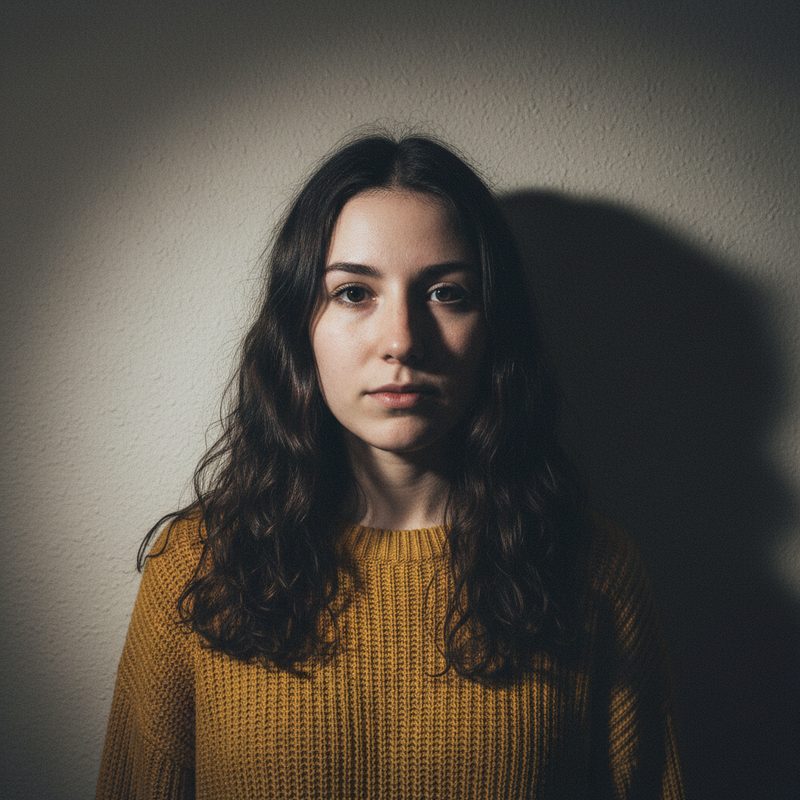
Shadows on the face or wall: retake
No honest tool can relight a face. A hard shadow across the face or on the wall behind you is a published rejection reason, and editing it away counts as retouching. Step away from the wall, face the window, and shoot again.

Plain wall, even light: ready
This is the shot the State Department's own guidance describes. From here the tool only has formatting work to do: framing to the published band, exact dimensions, and compression under the file limit.
The USCIS photo tool: forms without a file rule
USCIS instructions ask for printed 2 x 2 inch photos on thin glossy paper and publish no pixel dimension at all. So a "USCIS photo check" that grades your file against invented numbers is theater. What this tool does instead: for Form I-485, I-765, I-130, N-400 and the other USCIS forms, it prepares the print itself: head sized to the published band, compliant white background, and a 4 x 6 inch sheet of six copies ready for any photo kiosk. One thing no tool can sell you: a green card photo. Since December 12, 2025, USCIS captures that photo itself at your biometrics appointment.
One tool, every name people call it
Searchers call this a US passport photo tool, a passport photo tool free of charge, a US passport photo checker, a photo tool for USCIS forms, a US visa photo tool, or a passport photo cropping tool. They all describe what this page does: check a passport photo online free against the published figures, measure the head against the band, and crop to the exact frame when you choose to fix it. The one name that does not fit is the government's own: the State Department's photo tool exists for paper and in-person filings, and its own site says not to use it for online renewal.
Visa photo checker and DV lottery photo checker
The same tool is a US visa photo checker and a DV lottery photo checker, and the difference between those two is where most entries die: a DS-160 photo passes anywhere from 600 x 600 to 1200 x 1200 pixels, while a DV lottery photo must be exactly 600 x 600, and a DV entry with a wrong photo is disqualified rather than corrected. Check against the exact document you are filing, and if the file fails, the photo maker produces a compliant one from the same upload.
What is free, and what $9.99 buys
| What you get | Free | $9.99 photo |
|---|---|---|
| File checks against the published rule | Yes | Yes |
| Fix: framing, dimensions, compression | Watermarked preview | Clean file |
| Compliant white background | Shown in preview | Included |
| Full-resolution JPEG, no watermark | No | Yes |
| 4 x 6 inch print sheet, six copies | No | Yes |
| Email delivery + 30-day downloads | No | Yes |
One photo, one price, no subscription. If a paid photo fails to deliver what it promised, email us within 24 hours for a full refund; the terms say exactly that.
Photo checker questions
Is the passport photo checker free?
- Yes. Checking a photo against the published rules is free, runs in your browser, and needs no account. The watermarked preview of the fixed photo is free too. The clean, full-resolution photo with the print sheet is $9.99.
Does my photo get uploaded when I check it?
- Not for the check. The free check runs entirely in your browser. If you choose Make it compliant, the photo is uploaded securely for processing, the button says so, and it is stored privately and released only to you.
Is there a USCIS photo tool on this site?
- Yes. Select any USCIS form (I-485, I-765, I-130, N-400 and the rest) and the tool prepares the 2 x 2 inch photo those instructions require: head sized to the published band, white background, printed sheet included. USCIS publishes no digital pixel rule, so there is no file check to pass or fail; the tool prepares the print instead.
Can I check a green card photo?
- There is nothing to check. Since December 12, 2025, USCIS only accepts green card photos it captures itself at a biometrics appointment, so no self-submitted photo can be used for the card. Filing Form I-485 still takes two printed photos, and those you can prepare here.
What does the checker not check?
- Expression and lighting. The free check verifies the published file rules, detects the face and measures head size and eye position against the published band (with the crown estimated over the hair), and reads whether the background appears plain and white. No tool can honestly grade expression or lighting, and final acceptance of any photo is at the discretion of the agency reviewer.
Ten seconds now, or a resubmission letter later
The check is free, runs on your device, and shows the exact figure behind every pass and fail.
Check my photo free